Capture screens, regions & app windows without the bloat.
A lightweight, capture-first desktop recorder for macOS, Windows, and Linux. Built with live previews, audio monitoring, input overlays, fast trimming, and GIF export.
Free & open source · macOS, Windows & Linux
Everything you need for crisp screen recordings
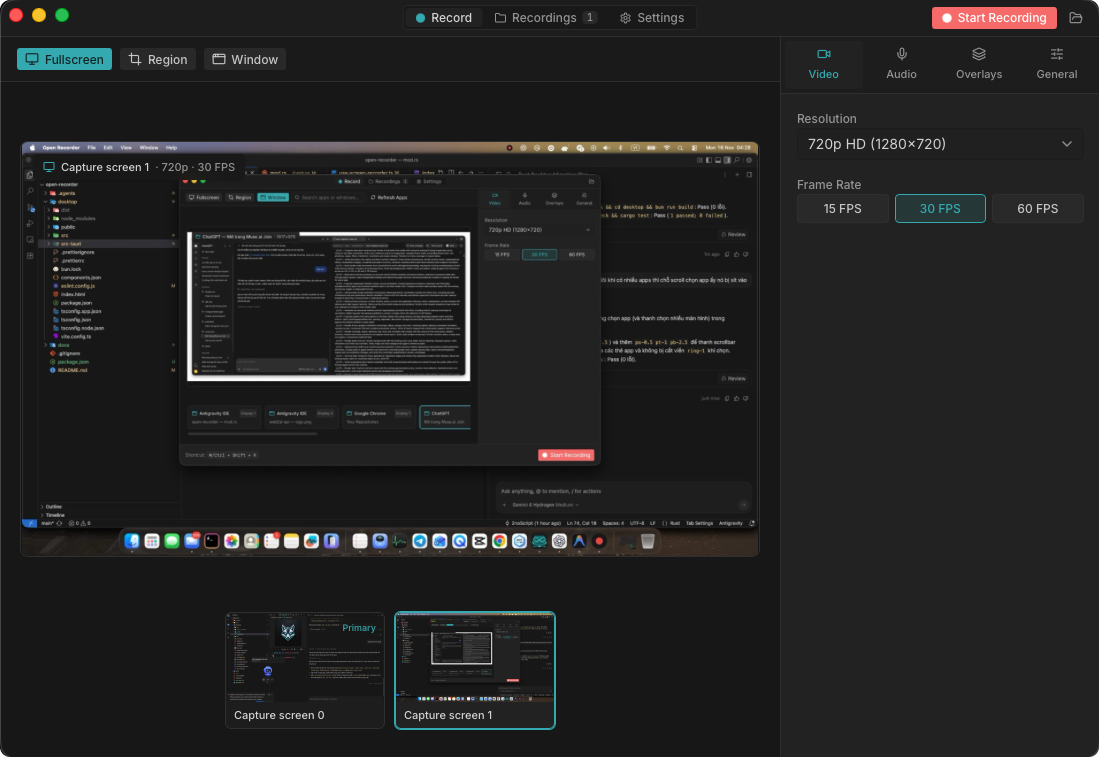
Display, Region & App Window Capture
Record fullscreen displays, drag a custom region directly on the live preview, or target any open application window with search and multi-monitor support.
Microphone & Real-Time VU Meter
Select audio input devices and monitor microphone levels live before and during recording.
Mouse Highlight, Keystrokes & Camera PiP
Show system-wide click highlights, live keystroke badges, optional camera PiP, and screen annotations.
Instant Trim & GIF Export
Preview recordings directly from disk, trim clips with FFmpeg, and export crisp GIFs in seconds.
Local Library & Thumbnails
Recordings and thumbnails are stored cleanly on disk with fast SQLite indexing and instant playback.
Diagnostics & Tray Controls
Built-in Settings tab for FFmpeg checks, storage paths, OS privacy shortcuts, and quick system tray access.
Download Open Recorder
Choose the installer for your operating system, or browse all builds on GitHub.
macOS (Apple Silicon)
M1 / M2 / M3 / M4 Macs
macOS (Intel)
x86_64 Macs
Windows
Windows 10 & 11 (64-bit)
Linux (AppImage)
Universal portable binary
Linux (Debian / Ubuntu)
APT package installer